-
Re: RPi desktop on a Acer Aspire TC-780 - any gotya's ?
From The Natural Philosopher@3:633/10 to All on Fri Nov 20 15:45:02 2026On 20/11/2026 15:38, R.Wieser wrote:
Theo,
If you keep some amount like 10% of the SSD zeroed then the
controller can use those blocks to improve the wear lifetime
('over provisioning').
Do you mean unpartitioned, or would something special (zeroed?) be needed ?
And thanks for the suggestion.
Regards,
Rudy Wieser
I've been using swap on SSD on this machine for several years. No issues
at all
I think one key thing is use a much bugger drive than you (think you)
need. I have 250GB here and use about 130GB
--
"What do you think about Gay Marriage?"
"I don't."
"Don't what?"
"Think about Gay Marriage."
--- PyGate Linux v1.5.19
* Origin: Dragon's Lair, PyGate NNTP<>Fido Gate (3:633/10)
-
From Theo@3:633/10 to All on Fri Nov 20 16:16:58 2026In comp.sys.raspberry-pi R.Wieser <address@is.invalid> wrote:
Theo,
If you keep some amount like 10% of the SSD zeroed then the
controller can use those blocks to improve the wear lifetime
('over provisioning').
Do you mean unpartitioned, or would something special (zeroed?) be needed ?
'Empty'. When you delete a file, typically filesystems tell the device that the blocks are no longer used (this is called 'TRIM') and it can put them
back into the empty block pool. The more empty blocks there are, the more breathing space the SSD has to use when parts of the flash wear out.
If you zero blocks, the SSD can also decide they're 'empty'. If you leave parts unpartitioned but still containing data from the last time it was
used, the SSD is still contractually obliged to keep the data in case you
need it another time and so it can't reallocate them to cover wear.
Just making a big file and then deleting it is usually enough to trigger
TRIM of the blocks, but also zeroing the SSD and then leaving 10% (or
whatever) unpartitioned works too.
This can also help with 'performance consistency': if you want to write but
the SSD has to do a lot of juggling to find an empty block, maybe erasing
and shuffling some other blocks, then you can get erratic performance under heavy load. But that's only really an issue with big write workloads like database servers, not domestic desktop use.
Theo
--- PyGate Linux v1.5.19
* Origin: Dragon's Lair, PyGate NNTP<>Fido Gate (3:633/10)
-
From Richard Kettlewell@3:633/10 to All on Fri Nov 20 17:39:44 2026"R.Wieser" <address@is.invalid> writes:
Theo,
'Empty'. When you delete a file, typically filesystems tell the
device that the blocks are no longer used
Off by default in ext4, I believe.
Ah, you mean I should never fully use the whole partition ("Used
space" vs "Free space"). With 128GB to work with I'm not going to
worry about that. :-)
If you zero blocks, the SSD can also decide they're 'empty'.
I don't understand : when a block is not part of any file chain than its unused. The wear-leveling process could commandeer such blocks at any
time - even though that could twart a later "undelete" attempt.
The drive doesn?t know which (logical) blocks are not part of a file,
unless the OS tells it.
--
https://www.greenend.org.uk/rjk/
--- PyGate Linux v1.5.19
* Origin: Dragon's Lair, PyGate NNTP<>Fido Gate (3:633/10)
-
From R.Wieser@3:633/10 to All on Fri Nov 20 16:38:22 2026Theo,
If you keep some amount like 10% of the SSD zeroed then the
controller can use those blocks to improve the wear lifetime
('over provisioning').
Do you mean unpartitioned, or would something special (zeroed?) be needed ?
And thanks for the suggestion.
Regards,
Rudy Wieser
--- PyGate Linux v1.5.19
* Origin: Dragon's Lair, PyGate NNTP<>Fido Gate (3:633/10)
-
From R.Wieser@3:633/10 to All on Fri Nov 20 18:29:41 2026Theo,
'Empty'. When you delete a file, typically filesystems tell the
device that the blocks are no longer used
Ah, you mean I should never fully use the whole partition ("Used space" vs "Free space"). With 128GB to work with I'm not going to worry about that.
:-)
If you zero blocks, the SSD can also decide they're 'empty'.
I don't understand : when a block is not part of any file chain than its unused. The wear-leveling process could commandeer such blocks at any
time - even though that could twart a later "undelete" attempt.
Hmmm ... Does Linux even have an "undelete" method ?
Also, files can contain lots of zeroes. How will the wear-leveling
mechanism know that such in-use blocks filled with zeroes should not be
taken ?
If you leave parts unpartitioned but still containing data from
the last time it was used, the SSD is still contractually obliged
to keep the data in case you need it another time
That doesn't make any sense. The data in blocks not part of any partition
(or file!) needs to be kept ? For what reason ?
but also zeroing the SSD and then leaving 10% (or whatever)
unpartitioned works too.
Again, I do not understand. The blocks in the unpartitioned area might be zeroed out, but the moment the wear-leveling mechanism swaps such a block
out with one inside a partition that swapped-out block now in the unpartitioned area is going to contain data.
Regards,
Rudy Wieser
--- PyGate Linux v1.5.19
* Origin: Dragon's Lair, PyGate NNTP<>Fido Gate (3:633/10)
-
From R.Wieser@3:633/10 to All on Sat Nov 21 09:54:52 2026Richard,
The drive doesn't know which (logical) blocks are not part of
a file, unless the OS tells it.
Inxdeed. I mixed up the drive smarts with the filesystem the OS puts on the drive.
iow, the drive has no concept of used and non-used blocks. It just goes for the (write)usage-count of each block on its drive. Contents are irrelevant. It could swap two blocks that are both in use by a partition and the filesystem on it.
The /only/ reason I could imagine for having blocks in their erased state
(not sure if that is all zeroes or all ones) is that, when swapping such a block in, the erase cycle could be skipped - making it a bit faster.
Regards,
Rudy Wieser
--- PyGate Linux v1.5.19
* Origin: Dragon's Lair, PyGate NNTP<>Fido Gate (3:633/10)
-
From Paul@3:633/10 to All on Sun Nov 22 08:24:50 2026On Sat, 11/21/2026 5:42 AM, Andy Burns wrote:
"R.Wieser" wrote:
Unless ... there is some gotya there ofcourse. Is there ?
Given you don't care about the existing windows installation, I have a suggestion ... stop looking for gotchas, boot it from usb, nuke the disk contents, let PiOS choose its default partitioning scheme on the 128GB M.2 drive, leave the 1TB drive for later use.
Standard best practice for installations, is to unplug the
things you do not want the installer to use.
That's so boot materials do not end up on the drive
opposite the one that got the OS files.
Some people who come to USENET, have the most convoluted
combination of GRUB on this disk, they unplug something,
something else no longer boots and so on. A royal mess.
Criss-cross boot materials. And a royal mess, means you're
wasting personal time, every time you have to sort that out.
The OP probably doesn't even know that modern installers
have a UEFI bias, some curb-side machines have legacy BIOS,
and installing on them is extra difficult, because the
small-BIOS-partition is missing, and the *installer*
will not make one for you. You have to know that partition
is necessary, you can pre-stage it using gparted. But you
can only be doing that, if you happen to know about the
Legacy thing.
There was a time, when boot media was Hybrid, and it
did not have a bias, and it treated Legacy and UEFI
machines with the same level of respect. Certain people
in the industry have an axe to grind now, which is
why they treat Legacy machines badly.
Paul
--- PyGate Linux v1.5.19
* Origin: Dragon's Lair, PyGate NNTP<>Fido Gate (3:633/10)
-
From The Natural Philosopher@3:633/10 to All on Sat Nov 21 12:37:53 2026On 21/11/2026 11:55, R.Wieser wrote:
And yes, nuking whats on the drive(s) and and installing Linux is what my initial thought was. I just wanted to make sure that I would not run into any known problems - to anyone in these newsgroups - while attempting to do so.
Fairy Nuff.
Mind you, it would be my first time installing this OS as well as doing it
on a 64-bit UEFI 'puter. Don't blame me for being a bit carefull.
Only issue I had last time I had an issue was needing to cycle through
various boot options in the BIOS before I found one that worked, I think secure boot and legacy boot did not, but UEFI did...several years now. I forget.
Once that hurdle was cleared it was painless
--
"When one man dies it's a tragedy. When thousands die it's statistics."
Josef Stalin
--- PyGate Linux v1.5.19
* Origin: Dragon's Lair, PyGate NNTP<>Fido Gate (3:633/10)
-
From R.Wieser@3:633/10 to All on Sat Nov 21 12:55:22 2026Andy,
Unless ... there is some gotya there ofcourse. Is there ?
Given you don't care about the existing windows installation, I have a suggestion ... stop looking for gotchas, boot it from usb, nuke the disk contents, let PiOS choose its default partitioning scheme on the 128GB M.2 drive, leave the 1TB drive for later use.
Are you aware of any possible gotya's in your above-described process ?
Nothing about the UEFI possibly being difficult for example ? Nothing about
a Linux stub for it that needs to be pre-configured ? Maybe the Linux ISO needs some kind of special handling? Or a reason why I would not be able
to boot the Linux ISO from USB on 64bit hardware ?
That is the kind of gotya's I'm asking about.
And yes, nuking whats on the drive(s) and and installing Linux is what my initial thought was. I just wanted to make sure that I would not run into any known problems - to anyone in these newsgroups - while attempting to do so.
Mind you, it would be my first time installing this OS as well as doing it
on a 64-bit UEFI 'puter. Don't blame me for being a bit carefull.
Regards,
Rudy Wieser
--- PyGate Linux v1.5.19
* Origin: Dragon's Lair, PyGate NNTP<>Fido Gate (3:633/10)
-
From mm0fmf@3:633/10 to All on Sat Nov 21 12:40:59 2026On 21/11/2026 10:42, Andy Burns wrote:
"R.Wieser" wrote:
Unless ... there is some gotya there ofcourse. Is there ?
Given you don't care about the existing windows installation, I have a suggestion ... stop looking for gotchas, boot it from usb, nuke the disk contents, let PiOS choose its default partitioning scheme on the 128GB
M.2 drive, leave the 1TB drive for later use.
Rudi has no intention of doing anything. This is typical of most of his trolling posts. Ask a question. Respond to each answer with why the
answer is sub-optimal for his specific instance. Garner further
responses from people trying to help and knock them back. Lather, rinse, repeat.
Just look at his output in the archives for proof.
Your suggestion is eminently sensible. He got the computer for free so
even if he totals it to a non-booting hulk, he's lost nothing and can
always strip it for parts. But his response to your suggestion is to
offer more possible things that could go wrong and hope he can continue
the trolling.
A normal person would have just downloaded the ISO to a USB stick and
tried it. But Rudi's trolling as per.
--- PyGate Linux v1.5.19
* Origin: Dragon's Lair, PyGate NNTP<>Fido Gate (3:633/10)
-
From R.Wieser@3:633/10 to All on Sat Nov 21 10:14:38 2026Paul,
I can boot into Win10 alright, but than I'm shown a user-login screen.
Which I can't pass (?). So, no access to Disk Management either (?).
A technical challenge then :-)
OK, now I see why you're in a paving mood.
One problem is, there were some nice (reasonably easy)
hacks to become Administrator while booting.
I could do all that you described there, but I do not really see the need
for it (other than to gain some insight into Win10 that I will never use). I only powered the 'puter up because I wanted to check if it still functioned
(I took it from the curb, so it could have been a paperweight).
I'm assuming that the Linux installation media includes a way to do some
disk management (like Windows does on its installation media), and thats al
I need. Heck, it might even make suggestions ! :-)
Unless ... there is some gotya there ofcourse. Is there ?
(nonwithstanding, I saved your post for post for eventual future use)
Regards,
Rudy Wieser
--- PyGate Linux v1.5.19
* Origin: Dragon's Lair, PyGate NNTP<>Fido Gate (3:633/10)
-
From R.Wieser@3:633/10 to All on Sat Nov 21 14:40:26 2026mm0fmf,
Rudi has no intention of doing anything. This is typical of most of his trolling posts. Ask a question. Respond to each answer with why the
answer is sub-optimal for his specific instance.
Really ? I asked a question which, as to date , *noone* has even
acknowledged - even though I made quite clear I wanted to have it answered
(a "none that I know of" would have been enough).
The other responses, like what kind of drive I would actually have or how wear-leveling works or how the drives are partitioned and formatted under Windows ? Interresting, but in no way anything that would have any
influence to if I would be able to install Linux.
... or it would fall under the "gotya's" I asked for.
Iow, next time think you see me "rejecting" something, ask yourself how it
is of any consequence to the question I asked. If its not, than do perhaps realize that its *you* are who is refusing to answer the question.
A normal person would have just downloaded the ISO to a USB stick
and tried it. But Rudi's trolling as per.
A *normal* person would, before engaging in something new to them, ask
people around them if they have any advice.
You ? You implicitily claim you just ... do something - and than ofcourse, when
something goes wrong, complain about how you could not have known that.
Yeah, duh!
Regards,
Rudy Wieser
--- PyGate Linux v1.5.19
* Origin: Dragon's Lair, PyGate NNTP<>Fido Gate (3:633/10)
-
From R.Wieser@3:633/10 to All on Sun Nov 22 07:40:04 2026druck,
Really ? I asked a question which, as to date , *noone* has even
Here we go again.
acknowledged - even though I made quite clear I wanted to have it
answered
(a "none that I know of" would have been enough).
"*noone* has answered your loaded question in exactly the way you deem to
be correct (not that you would admit it if they did), so you'll keep trolling until everyone else dies of boredom.
You're welcome to quote where "noone" did actually answer my question.
You know, its always "remarkable" to see people like you and mm0fmf claim
some kind of wrongdoing, but always "forget" to support it with anything.
And when I than ask for such support its most allways the end of the conversation. Odd, don't you think ?
Regards,
Rudy Wieser
--- PyGate Linux v1.5.19
* Origin: Dragon's Lair, PyGate NNTP<>Fido Gate (3:633/10)
-
From Paul@3:633/10 to All on Mon Nov 23 06:27:58 2026On Sat, 11/21/2026 6:55 AM, R.Wieser wrote:
Andy,
Unless ... there is some gotya there ofcourse. Is there ?
Given you don't care about the existing windows installation, I have a
suggestion ... stop looking for gotchas, boot it from usb, nuke the disk
contents, let PiOS choose its default partitioning scheme on the 128GB M.2 >> drive, leave the 1TB drive for later use.
Are you aware of any possible gotya's in your above-described process ?
Nothing about the UEFI possibly being difficult for example ? Nothing about a Linux stub for it that needs to be pre-configured ? Maybe the Linux ISO needs some kind of special handling? Or a reason why I would not be able to boot the Linux ISO from USB on 64bit hardware ?
That is the kind of gotya's I'm asking about.
And yes, nuking whats on the drive(s) and and installing Linux is what my initial thought was. I just wanted to make sure that I would not run into any known problems - to anyone in these newsgroups - while attempting to do so.
Mind you, it would be my first time installing this OS as well as doing it on a 64-bit UEFI 'puter. Don't blame me for being a bit carefull.
Regards,
Rudy Wieser
You used to be able to depend on the installer treating UEFI and
Legacy users equally. That is not the case today. When the hardware
presents a "Legacy signature", the stubborn installer tries to
install as UEFI, then it will complain later about "this or that
is missing, oh dearie me".
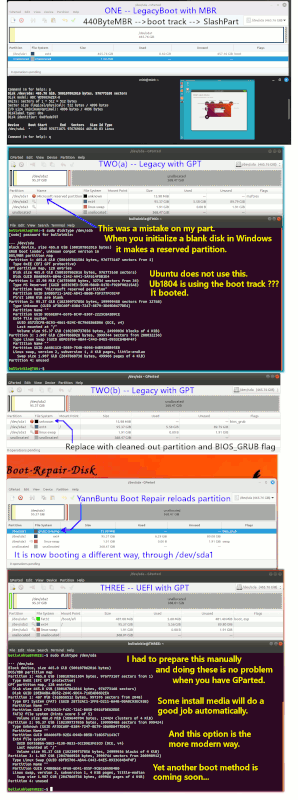
There are at least three install patterns.
Disk partitioning can be MBR or GPT.
Boot can be Legacy (CSM) or UEFI.
That gives:
ONE Legacy with MBR
TWO(a) Legacy with GPT
TWO(b) Legacy with GPT showing a BIOS-GRUB partition and repaired by Yannbuntu Repair DVD
THREE UEFI with GPT (the System partition has its own identifier type, to give any special properties)
Legacy with MBR is straight forward.
Legacy with GPT (could be a >2TB disk) uses a BIOS-partition of small size.
That's similar to the GRUB storage area at the beginning of an MBR disk it would have used.
UEFI with GPT is straight forward, and has a System partition "EFI System Partition" or ESP (FAT32).
It's quite likely you could combine the last two and do a hybrid boot, so that both UEFI and Legacy modes would work. But that would be showing off. It might be
useful for those days, when Secure Boot (as a sub-part of UEFI) becomes wobbly. I got one red rectangle on the Secure Boot test machine, and disabling Secure Boot there helped.
Every time I do these, I learn something, and it seems the Ubuntu 18.04.1 disc I used for test, did not appreciate finding a junk partition after a clean of the disk had been done before hand. Now, that's another quirk I have to remember
and I have to remove that before doing an install. I will be trying that out when
I try the RPi disc I've got.
So let's collect some pictures of various boot scenarios.
[Picture] Some-Boot-Pictures.gif 1280x3440
https://imgur.com/a/emsgZ9q
https://postimg.cc/rzj20swK
https://i.postimg.cc/15hmdNxc/Some-Boot-Pictures.gif
Now, using the picture THREE in there, try an RPi install
in place of the Ubuntu 1804 slash partition.
*******
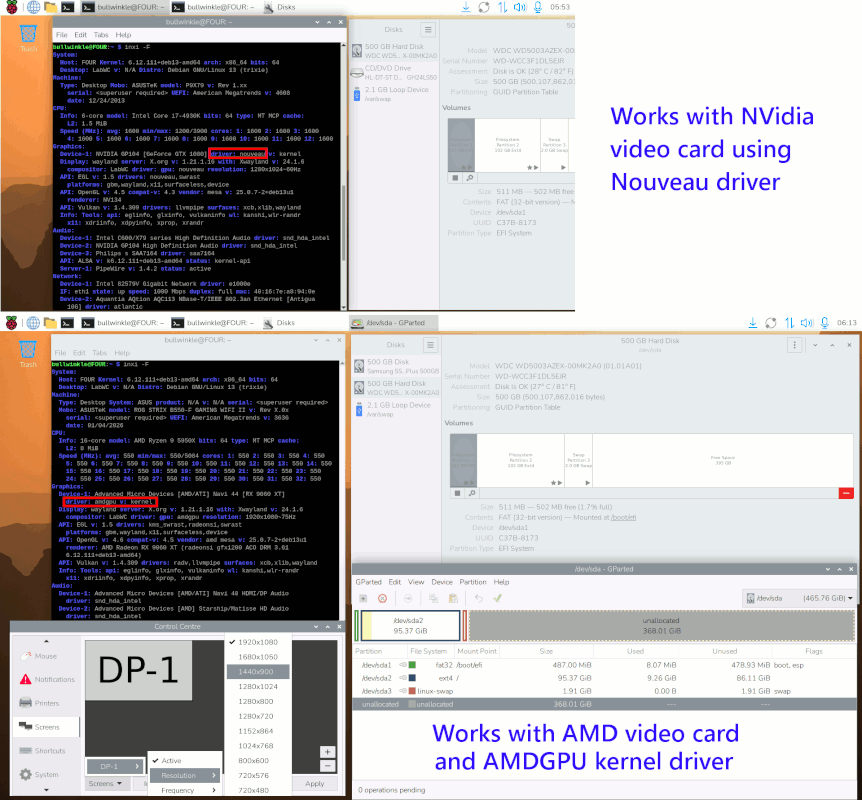
The Raspbi from four years ago is relatively broken.
You should get a fresh one from Oct 2026 or so, as it
worked with both the Nvidia machine and the AMD machine
on video cards.
[Picture] 2026-10-13-raspios-trixie-amd64-install.gif 1920x1781
https://imgur.com/a/hofXUKh
https://postimg.cc/RWVz7bRc
https://i.postimg.cc/rw5FLBRY/2026-10-13-raspios-trixie-amd64-install.gif
The current DVD is not nearly as annoying as the four year old disc is.
Paul
--- PyGate Linux v1.5.19
* Origin: Dragon's Lair, PyGate NNTP<>Fido Gate (3:633/10)
-
From Richard Kettlewell@3:633/10 to All on Sun Nov 22 13:47:25 2026"R.Wieser" <address@is.invalid> writes:
druck,
Really ? I asked a question which, as to date , *noone* has even
acknowledged - even though I made quite clear I wanted to have it
answered
(a "none that I know of" would have been enough).
Here we go again.
"*noone* has answered your loaded question in exactly the way you
deem to be correct (not that you would admit it if they did), so
you'll keep trolling until everyone else dies of boredom.
You're welcome to quote where "noone" did actually answer my question.
You?re getting pushback, AFAICT, because you?ve asked the same
open-ended question four times, in a thread full of well-meant advice:
My question is : are there any gotya's I should be aware of ? A
specific BIOS configuration perhaps ? Anything else I should be
aware of ?
But... No known gotya's ?
Unless ... there is some gotya there ofcourse. Is there ?
Are you aware of any possible gotya's in your above-described
process ?
Apparently, asking it multiple times doesn?t change the answers, instead
it gets people?s backs up.
--
https://www.greenend.org.uk/rjk/
--- PyGate Linux v1.5.19
* Origin: Dragon's Lair, PyGate NNTP<>Fido Gate (3:633/10)
-
From The Natural Philosopher@3:633/10 to All on Sun Nov 22 11:16:12 2026On 22/11/2026 06:40, R.Wieser wrote:
And when I than ask for such support its most allways the end of the conversation. Odd, don't you think ?
No.
That's normal for people who have decided (rightly or wrongly) that you
don't actually want to be helped
--
WOKE is an acronym... Without Originality, Knowledge or Education.
--- PyGate Linux v1.5.19
* Origin: Dragon's Lair, PyGate NNTP<>Fido Gate (3:633/10)
-
From R.Wieser@3:633/10 to All on Sun Nov 22 11:05:01 2026Daniel70,
Rudi, you MUST have at least half a clue how to install Linux, why not
give it a go??
I think I already answered that question - a few times over even.
Regards,
Rudy Wieser
--- PyGate Linux v1.5.19
* Origin: Dragon's Lair, PyGate NNTP<>Fido Gate (3:633/10)
-
From The Natural Philosopher@3:633/10 to All on Sun Nov 22 11:14:48 2026On 21/11/2026 22:45, druck wrote:
On 21/11/2026 13:40, R.Wieser wrote:
mm0fmf,
"*noone* has answered your loaded question in exactly the way you deem
to be correct (not that you would admit it if they did), so you'll keep trolling until everyone else dies of boredom.
Just pack it in.
LOL!
---druck
--
WOKE is an acronym... Without Originality, Knowledge or Education.
--- PyGate Linux v1.5.19
* Origin: Dragon's Lair, PyGate NNTP<>Fido Gate (3:633/10)
-
From R.Wieser@3:633/10 to All on Sun Nov 22 16:34:50 2026Richard,
You're getting pushback, AFAICT, because you've asked the same
open-ended question four times,
And each time it was ignored. In a person-to-person conversation that would be quite rude. It is that I really wanted an answer, otherwise I would
have exited the conversation myself.
And no, it wasn't open-ended. I asked if anyone knew of any stuff I should be aware of. Either you do, or you don't.
in a thread full of well-meant advice:
But none of it of any consequence in regard to the installing of the RPi
Linux on the TC-780.
What kind of HDD+SSD "harddisk" the 'puter has ? It doesn't make a difference, as long as it will accept a new OS.
Being able to look at the current partitioning under Windows ? Its going to be trashed, so I don't have any use for that information either.
The only information I have use for was the advice to put everything on the SSD. But again, thats not something that would make-or-break anything.
Apparently, asking it multiple times doesn't change the answers, instead
it gets people's backs up.
What answers ? :-(
Imagine how frustrating it was to me having asked a question and not getting any response to it. Not even when I clearly indicated I wanted one.
Regards,
Rudy Wieser
--- PyGate Linux v1.5.19
* Origin: Dragon's Lair, PyGate NNTP<>Fido Gate (3:633/10)
-
From Paul@3:633/10 to All on Mon Nov 23 09:23:09 2026On Sun, 11/22/2026 12:05 PM, R.Wieser wrote:
The specs mention an on-board video-card :
Discrete graphics card model NVIDIA? GeForce? GT 730
On-board graphics card model Intel? HD Graphics 630
I'm not at all sure what the difference between a "Discrete graphics card" and an "On-board graphics card" is though.
Thanks. The above certainly are, I think, a few gotya's to recon with.
Regards,
Rudy Wieser
The HD630 is inside the Intel CPU, and there are some interface
circuits (for making a "standard" output) inside the PCH chipset.
The GT 730 is a separate chip.
The software for running two GPUs hooked together in this
particular (and peculiar) way, is here. On Linux, it is
called "Bumblebee".
https://en.wikipedia.org/wiki/Nvidia_Optimus
"A project called Bumblebee[4] is an alternative open source
implementation of Optimus support for Linux.[5]"
The GT 730 is "high power" and runs down the battery when engaged.
It is typically switched in when playing a 3D game. For regular
mostly-2D desktop display duties, the Intel HD630 can do that,
and the GT 730 stands down. The NVidia chip does not drive
the display directly. It deposits double-buffered frames
into system memory. The Intel chip then reads out the frame
buffer from system memory (whether it is written by system
software or written by the NVidia chip). By coordinating the two chips
through system memory, that means there are no tricky
switching circuits near the video output high speed
signals.
Years ago, we used to chain GPUs together via "overlay" of the
output video signal, one video output on top of the other.
One of the managers at work (I suspect more as a joke than
anything) was encouraging us to do overlays like that
in our hardware. The method used today keeps what is
going on "rather private", making it harder to hack into.
What is used today is *not* the overlay method. I have a
Mac computer here, a Voodoo card, and those were wired with
external cabling to make overlays for gaming. What's in
your computer, doesn't rely on external cables between
the Intel GPU and the NVidia one.
The above description isn't going to help you much, and
you really need the block diagram showing the wiring and
so on, to make better sense of how this works.
Paul
--- PyGate Linux v1.5.19
* Origin: Dragon's Lair, PyGate NNTP<>Fido Gate (3:633/10)
-
From Richard Kettlewell@3:633/10 to All on Sun Nov 22 21:18:41 2026"R.Wieser" <address@is.invalid> writes:
Apparently, asking it multiple times doesn't change the answers,
instead it gets people's backs up.
What answers ? :-(
Imagine how frustrating it was to me having asked a question and not
getting any response to it. Not even when I clearly indicated I
wanted one.
If someone isn?t answering a question on Usenet, it is usually because
they don?t know the answer. What do you expect, twenty people responding
?I don?t know??
Anyway, if you want to keep annoying people (or at least, some people),
keep on doing what you?re doing. Up to you.
--
https://www.greenend.org.uk/rjk/
--- PyGate Linux v1.5.19
* Origin: Dragon's Lair, PyGate NNTP<>Fido Gate (3:633/10)
-
From R.Wieser@3:633/10 to All on Sun Nov 22 18:05:36 2026Paul,
You used to be able to depend on the installer treating UEFI and
Legacy users equally. That is not the case today. When the hardware
presents a "Legacy signature", the stubborn installer tries to
install as UEFI, then it will complain later about "this or that
is missing, oh dearie me".
I did consider to try to install legacy, but also recognised that that would probably not wise in this day-and-age. UEFI it is.
There are at least three install patterns.
Disk partitioning can be MBR or GPT.
Boot can be Legacy (CSM) or UEFI.
I'm going to install on the 128GB SSD, so I'm going for MBR, with the UEFI boot.
Legacy with MBR is straight forward.
[snip]
Wait, no chance of having UEFI with MBR ?
It might be useful for those days, when Secure Boot (as a sub-part
of UEFI) becomes wobbly.
I've disabled secure boot (and the TPM module), so no wobbeling to be
expected.
did not appreciate finding a junk partition after a clean of
the disk had been done before hand.
Are you telling me that I need to erase the disk befor attempting
installation ? Is that something you know I can do as part of the
installing process, or do I need to get some special tool for it ?
So let's collect some pictures of various boot scenarios.
The first link doesn't work for me (I've got JS disabled), and the two other links point to, AFAIKS, to the same image.
Alas, all I get are 298px ? 800px images, and upscaling doesn't help making them any more readable. :-|
The same readibility problem goes for the next image(s).
The Raspbi from four years ago is relatively broken.
You should get a fresh one from Oct 2026 or so,
[from your other post]
I generally use the 64-bit ones.
https://downloads.raspberrypi.com/rpd_x86/images/rpd_x86-2026-10-15/2026-10-13-raspios-trixie-amd64.iso
:-) Thats the one I downloaded last week.
as it worked with both the Nvidia machine and the AMD machine
on video cards.
The specs mention an on-board video-card :
Discrete graphics card model NVIDIA? GeForce? GT 730
On-board graphics card model Intel? HD Graphics 630
I'm not at all sure what the difference between a "Discrete graphics card"
and an "On-board graphics card" is though.
Thanks. The above certainly are, I think, a few gotya's to recon with.
Regards,
Rudy Wieser
--- PyGate Linux v1.5.19
* Origin: Dragon's Lair, PyGate NNTP<>Fido Gate (3:633/10)
-
From The Natural Philosopher@3:633/10 to All on Sun Nov 22 18:43:10 2026On 22/11/2026 13:47, Richard Kettlewell wrote:
Apparently, asking it multiple times doesn?t change the answers, instead
it gets people?s backs up.
Cf Greta the Doom Pixie...
--
I was brought up to believe that you should never give offence if you
can avoid it; the new culture tells us you should always take offence if
you can. There are now experts in the art of taking offence, indeed
whole academic subjects, such as 'gender studies', devoted to it.
Sir Roger Scruton
--- PyGate Linux v1.5.19
* Origin: Dragon's Lair, PyGate NNTP<>Fido Gate (3:633/10)
-
From Paul@3:633/10 to All on Mon Nov 23 14:00:01 2026On Sun, 11/22/2026 3:06 PM, Paul wrote:
On Sun, 11/22/2026 12:05 PM, R.Wieser wrote:
The specs mention an on-board video-card :
Discrete graphics card model NVIDIA? GeForce? GT 730
On-board graphics card model Intel? HD Graphics 630
I'm not at all sure what the difference between a "Discrete graphics card" >> and an "On-board graphics card" is though.
Thanks. The above certainly are, I think, a few gotya's to recon with.
Regards,
Rudy Wieser
The HD630 is inside the Intel CPU, and there are some interface
circuits (for making a "standard" output) inside the PCH chipset.
The GT 730 is a separate chip.
The software for running two GPUs hooked together in this
particular (and peculiar) way, is here. On Linux, it is
called "Bumblebee".
https://en.wikipedia.org/wiki/Nvidia_Optimus
"A project called Bumblebee[4] is an alternative open source
implementation of Optimus support for Linux.[5]"
The GT 730 is "high power" and runs down the battery when engaged.
It is typically switched in when playing a 3D game. For regular
mostly-2D desktop display duties, the Intel HD630 can do that,
and the GT 730 stands down. The NVidia chip does not drive
the display directly. It deposits double-buffered frames
into system memory. The Intel chip then reads out the frame
buffer from system memory (whether it is written by system
software or written by the NVidia chip). By coordinating the two chips through system memory, that means there are no tricky
switching circuits near the video output high speed
signals.
Years ago, we used to chain GPUs together via "overlay" of the
output video signal, one video output on top of the other.
One of the managers at work (I suspect more as a joke than
anything) was encouraging us to do overlays like that
in our hardware. The method used today keeps what is
going on "rather private", making it harder to hack into.
What is used today is *not* the overlay method. I have a
Mac computer here, a Voodoo card, and those were wired with
external cabling to make overlays for gaming. What's in
your computer, doesn't rely on external cables between
the Intel GPU and the NVidia one.
The above description isn't going to help you much, and
you really need the block diagram showing the wiring and
so on, to make better sense of how this works.
I should also point out the differences between laptop setups
and desktop mini-tower computers which have a standalone video card
when they were sold. The driver situation, the quirks, are different.
The laptop has one digital bus to the internal LCD panel,
and a second connection to a VGA or an HDMI connector on
the edge of the laptop. The Nvidia pins that would drive a
connector are not used. System memory is used for communications
between devices.
Laptop (Linux Bumblebee) -- materials all on motherboard
frameBuffers VRAM
\ |
CPU System Mobile
+--iGPU ----memory --- NVidia
| |
+--PCH /---+
| Nvidia output not used at HDMI/DP level
<-Vid--+
Out
***********************
Desktop (Separate video subsystems, separate drivers, not a Bumblebee)
The user chooses which output to use, when they want.
when the vid card fails, the user can plug to the iGPU instead.
frameBuffers
\
CPU System
+--iGPU ----memory
|
+--PCH
|
<-Vid--+
Out <--- I/O Plate connectors of Desktop tower computer
VRAM
|
Desktop
NVidia (PCIe)
|
<-Vid-+
Out <--- Video card slot connectors
Paul
--- PyGate Linux v1.5.19
* Origin: Dragon's Lair, PyGate NNTP<>Fido Gate (3:633/10)
 Web-based telnet client
 DOS games (playable from your web browser)
BinkTerm-PHP web forum interface
Other Links
What is a BBS?
Doors installed on this BBS
Digital Distortion Doors & Tools
Door stats
Trivia scores
Message networks
Terminal software
Emulated games
Synchronet archiver setup
Ready.gov anti-terrorist guidelines as of 2003
Other services
Telnet
RLogin
 IRC
 Email & news access
Feel free to send me an email.
BBS UPS stats
Who's Online
Recent Visitors
-
czex
Fri Oct 30 10:11:12 2026
from Tuscaloosa, AL via HTTP -
drillsar
Mon Jun 1 09:14:25 2026
from d via HTTP -
drillsar
Sun May 31 13:54:57 2026
from d via HTTP -
drillsar
Sun May 31 01:54:43 2026
from d via HTTP
-
czex
System Info
Sysop: Eric Oulashin Location: Beaverton, Oregon, USA Users: 122 Nodes: 16 (0 / 16) Uptime: 19:26:57 Calls: 9,720 Calls today: 3 Files: 9,608 D/L today: 337 files
(265M bytes)Messages: 434,898